SMS / Text Messaging Terms
Last updated: August 3, 2026 · Effective: August 3, 2026
In short
Voiczer sends transactional text messages on behalf of independent home-service businesses to their own customers — quote, invoice, contract, and payment-receipt texts tied to that customer’s specific job. Messages are opt-in, one-to-one, and low-frequency. Reply STOP to opt out or HELP for help; message and data rates may apply. We never sell or share mobile numbers for marketing.
Voiczer is a software application operated by RS NEXT LLC (d/b/a Voiczer). Independent home-service businesses — contractors, plumbers, electricians, and handymen — use Voiczer to manage their paperwork, including sending quotes, invoices, and contracts to their own customers. This page describes the text-message (SMS) program: what messages we send on a business’s behalf, who receives them, and how recipients opt in and opt out.
1. Who sends these messages, and to whom
The message sender is an independent home-service business that uses Voiczer. The message recipient is that business’s own customer — the homeowner or client who requested a quote, service, invoice, or contract. Messages are one-to-one and relate to that recipient’s specific job. They are transactional, not marketing: we do not send promotional or bulk text messages, and mobile numbers are never purchased, rented, or shared between businesses.
2. What messages you may receive
Depending on the business you are working with, you may receive texts such as:
- Quote ready — a link to view and approve a quote for your job.
- Invoice ready — a link to view and pay an invoice.
- Contract to sign — a link to review and electronically sign a document.
- Payment received — a confirmation/receipt when your payment is recorded.
Sample messages
Please find your quote attached. View your quote Q-1042 ($850.00) from [Business Name]: https://www.voiczer.com/... Reply STOP to opt out, HELP for help.
[Business Name] sent you “Service Agreement” (CON-1042) to sign: https://www.voiczer.com/... Reply STOP to opt out, HELP for help.
[Business Name]: We’ve received your payment of $850.00 for INV-1043. Thank you! Reply STOP to opt out.
3. How you opt in (consent)
You opt in directly with the home-service business serving you. Voiczer does not collect phone numbers through public bulk sign-up, purchased lists, or affiliates. Opt-in happens in one of these ways:
- Verbal / at point of service — during a job, quote request, service call, or booking, you give the business your mobile number and agree to receive texts about your quote, invoice, contract, and payment for that job.
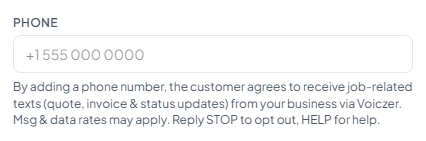
- In-app consent disclosure — when the business enters your number into the Voiczer app, the app shows a consent notice at the point of entry (see below). Your number is added only when you affirmatively agree; consent is never pre-checked, assumed, or transferred to another business.
- Text keyword — if you previously opted out, you can text START, YES, or UNSTOP to resume messages.
The consent notice shown when a business adds your number reads: “By adding a phone number, the customer agrees to receive job-related texts (quote, invoice & status updates) from [Business Name] via Voiczer. Msg & data rates may apply. Message frequency varies. Reply STOP to opt out, HELP for help,” with links to this page, the Privacy Policy, and the Terms.
4. Message frequency and rates
Messages are low-frequency and transactional — typically about one message per document or payment event, sent when the business takes an action or your payment is recorded. There is no recurring schedule. Message and data rates may apply depending on your mobile carrier and plan.
5. How to opt out or get help
Reply STOP to any message to stop receiving further texts; you will receive a single confirmation that you have been unsubscribed. Reply HELP for help. You can opt back in later by texting START, YES, or UNSTOP. Opt-out and help keywords are processed automatically through our messaging provider, Twilio Inc.
6. Privacy
Mobile numbers and SMS consent are used solely to deliver the documents and receipts for your own job, and are never sold or shared with third parties or affiliates for their own marketing. For details on how RS NEXT LLC (d/b/a Voiczer) handles your information, see the Privacy Policy at https://www.voiczer.com/privacy (which includes an SMS/text-messages disclosure) and the Terms at https://www.voiczer.com/terms.
This document is provided for transparency and does not constitute legal advice. © 2026 RS NEXT LLC (d/b/a Voiczer). All rights reserved.